

Basic State Management in Angular
Accelerate your Angular Apps with State Management using NgRx inspired by Redux

I am a Full Stack Developer working on Next Generation Software, Web & Mobile Technologies since 8+ years. Have a look on my portfolio: https://linktr.ee/mawaisshaikh
- I am Pakistan’s first AWS DevAx Mentor and an Auth0 Ambassador.
- Community Member (Google Developer Groups).
- Community Member (Angular).
- An open-source contributor. 💻
- Tech speaker. 🎤
- Mentor. 🚀
I have spoken at multiple international community events including google developer groups like #gdgSoweto, #AngularDutch, #ngKolachi as well 🙌
What is Ngrx ? ❤️
NgRx is an open source library that provides reactive state management for your Angular applications. Inspired by Redux, NgRx provides a way to maintain data in your Angular application as a single source of truth. NgRx uses streams to interact with a data store.
How NgRx works
There are five parts that constitute NgRx:
- Store
- Reducers
- Actions
- Selectors
- Effects
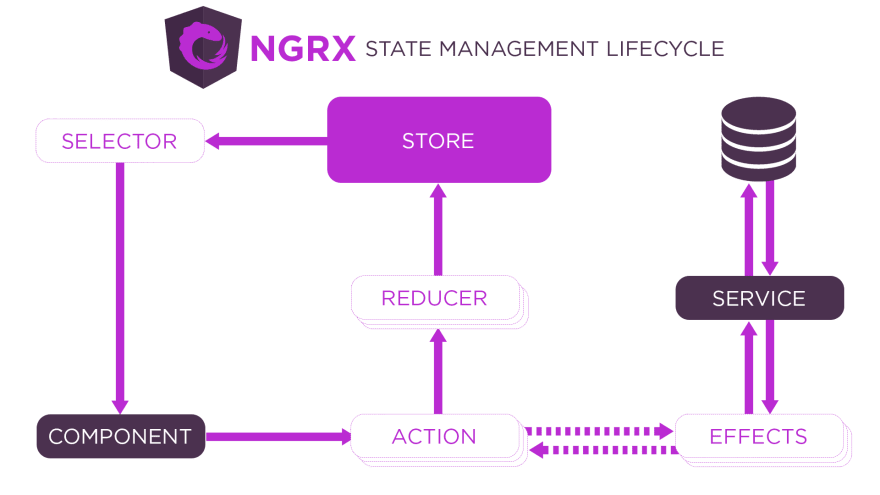
Key Concepts:
Pure Function:
A pure function as a function that doesn’t have an internal state. It means that all operations it performs are not affected by that state and given the same input parameters and produces the same deterministic output.
- Store: Your application’s state is maintained in the store. The store is immutable.
- Reducers: Reducers are functions that take the current state and an action as arguments, and return a new state result to store. In other words, (state, action) => newState
- Actions: Actions are unique events that can be dispatched from a component or service.
- Selectors: are pure functions used to select, derive and compose pieces of state.
- Effects: occur as a result from actions, and can also create actions when called. Effects primary responsibility is to create async side-effects (like service calls to APIs), that ultimately generate other actions.
Let's start with a sample application to deep dive in to State Management using NgRx
👉 Create a new angular app:
ng new redux-angular-app
👉 Install @ngrx /store npm module:
npm i @ngrx/store --save
👉 updations in app.module
// Ngrx imports for store and newly created reducer
import { StoreModule } from '@ngrx/store';
import { simpleReducer } from './ngrx/simple.reducer';

...

imports: [
    ...
    StoreModule.forRoot({ message: simpleReducer })
],
👉 Create a simpleReducer
import { Action } from "@ngrx/store";

export function simpleReducer(state: string = 'Hello World', action: Action) {
    console.log(action.type, state);

// updating and returning the newly state to store on the basis of dispatched action type
    switch (action.type) {
        case 'SPANISH':
            return state = 'Hola Mundo';

        case 'FRENCH':
            return state = 'Bonjour le monde';

        default:
            return state;
    }
}
👉 NgRx/Redux in action inside the desired component
// import the store from ngrx and observable from rxjs
import { Store } from '@ngrx/store';
import { Observable } from 'rxjs';

...

interface AppState {
  message: string;
}

...

// an observable in which we get updated state from store
message$: Observable<string>

constructor(
   private store: Store<AppState>,
) {
    // retrieve data from ngrx store
    this.message$ = this.store.select('message');
}

ngOnInit(): void {
}

// dispatching actions to reducer for further task to update the store with newly state
spanishMessage() {
    this.store.dispatch({ type: 'SPANISH' });
}

frenchMessage() {
    this.store.dispatch({ type: 'FRENCH' });
}
👉 Let's test 😊
<p>{{message$ | async}}</p>

<button (click)="spanishMessage()">Spanish</button>
<button (click)="frenchMessage()">French</button>
Github: https://github.com/muhammadawaisshaikh/redux-angular-ngrx/
Happy Redux 🚀


